Artificial intelligence is taking over the world today. More people use AI tools every single day, and that is no accident. AI saves time. It eliminates tedious technical barriers. It lets creators focus on what they actually care about: their passion.
When I first started building gotobirding.com, this technology simply did not exist. I could not just type a single prompt into a prompt box and watch a full, working site appear before my eyes.
I suffered a lot back then and had to learn everything from scratch. Every design decision, layout choice, and connection felt like climbing a steep mountain. As an environmental conservation engineer, I was not a web developer. I had zero experience with code, website servers, CSS, or complex site layouts. I knew birds, habitat restoration, field observation, and ecosystem protection—not web design!
Today, everything has changed. You do not need a degree in computer science to publish your work online. You do not need to spend weeks struggling with confusing tutorials.
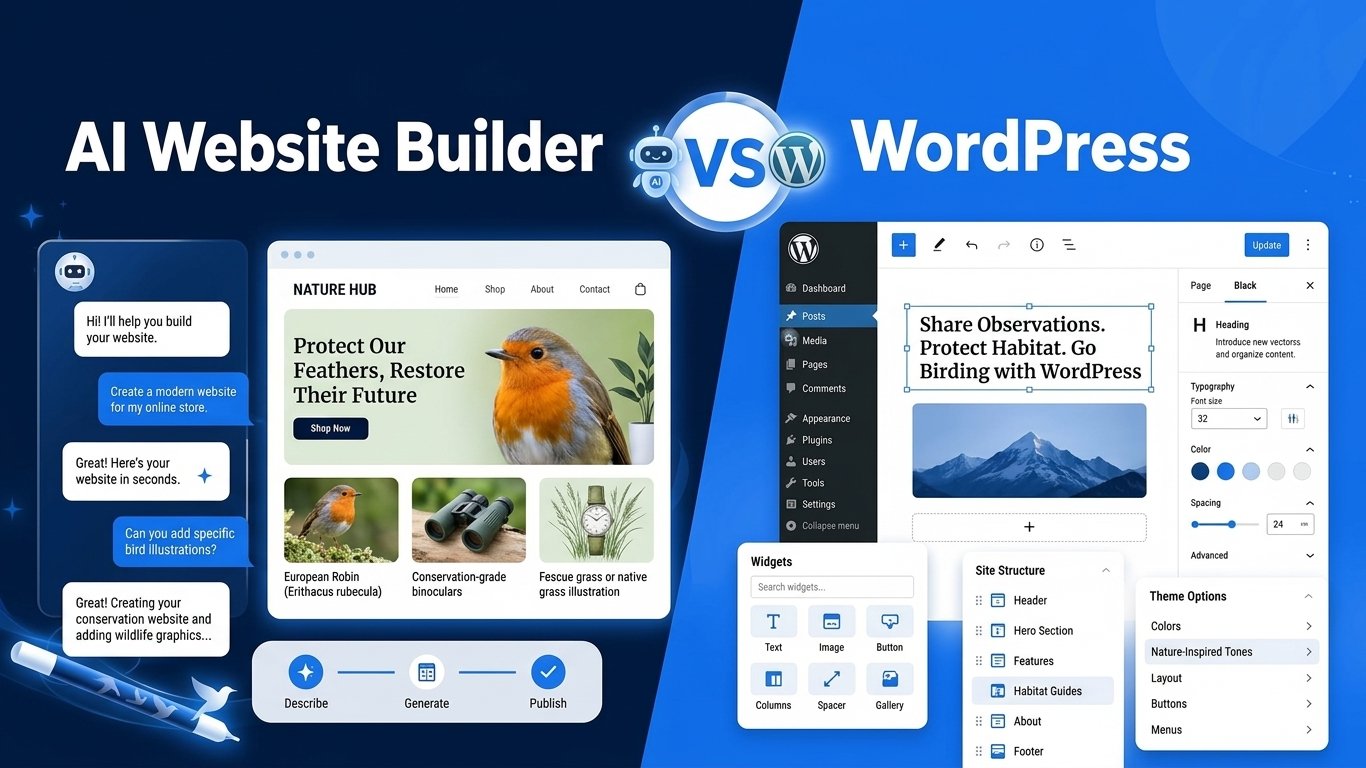
With the new WordPress.com AI Website Builder, you can launch a stunning, professional bird conservation blog, portfolio, or community portal in just a few minutes.
Affiliate Disclosure: This post contains affiliate links. If you click through and purchase a paid plan on WordPress.com, I may earn a small commission at no extra cost to you. I only recommend tools and resources that I personally use and trust for building conservation projects like gotobirding.com. Thank you for supporting our work!
Why You Need a Dedicated Conservation Website Today
Social media platforms are great for quick photo updates, but relying solely on them is risky. Algorithms change constantly and without warning. A post that reaches thousands of birders today might get buried tomorrow simply because a platform changed its ranking rules. You are always competing with viral distractions and endless scrolling.
More importantly, you do not own your social media page—the platform does. If a network alters its rules, shadowbans your account, or shuts down, your community and years of field observations can vanish overnight.
A dedicated website gives you complete control. It serves as your permanent digital headquarters on the internet, unaffected by social algorithm shifts.
Professional Credibility: A structured website projects authority. Whether you apply for grants, contact local municipalities, or partner with birding organizations, a dedicated site proves your project is serious and built to last.
Complete Ownership: Every article, field report, and photo you publish remains yours forever. You control the presentation without aggressive image compression or distracting ads.
Long-Term Search Visibility: People searching Google for specific advice—like “How to protect bluebird nest boxes”—will find your articles for years. Social posts disappear in hours, but well-optimized blog posts bring steady organic traffic for decades.
Direct Community Building: A website lets you collect email subscribers. When you publish a critical conservation alert or organize a local cleanup, you reach your audience directly in their inbox without asking an algorithm for permission.
What is the WordPress.com AI Website Builder?
The WordPress.com AI Website Builder is a brand-new, powerful feature designed specifically to remove the technical friction of site creation.
You no longer have to select a blank template and struggle to fill it from scratch. Instead, you simply describe your dream site in plain, everyday language, just as if you were talking to a web designer.
Example Prompt:
"I want a bird conservation blog focused on urban bird feeding, nest box setups, and field photography in Central Europe."
The AI reads your instructions and generates a complete, functional first draft instantly.
Within moments, it builds custom page layouts, generates starter content tailored to your specific niche, inserts relevant nature imagery, and applies cohesive color palettes and typography.
Crucially, this build is a starting point, not a rigid finished product. Once the AI generates your initial site, you stay in total control. You can rewrite copy, adjust tone and text length, swap stock images for your own bird photography, or add new pages and navigation menus—either manually using the intuitive WordPress block editor or by giving the AI further prompts.
It turns the overwhelming task of setting up a new website into an effortless, step-by-step editing process.
What the AI Creates for You Automatically:
When you run the AI Website Builder, it does not just hand you a bare-bones layout. It builds a cohesive, multi-page framework designed to get your project live fast.
- Custom Page Layouts: The system generates a clean home page, a dedicated “About” section to tell your story, an organized blog index for your articles, and an integrated contact layout.
- Tailored Starter Content: Instead of generic lorem ipsum text, the AI writes starter copy tailored specifically to your prompt, niche, and core conservation goals.
- Relevant Nature Images: The tool selects high-quality stock photography, adding nature landscapes and wildlife visuals that instantly give your site a clean, outdoor aesthetic.
- Color Palettes & Typography: It applies balanced color themes and highly readable font combinations matching your chosen tone, saving you hours of design tweaking.
Once the AI builds your first draft, you maintain complete creative control. You are never stuck with its choices—you can rewrite text, swap stock images for your own original bird photography, tweak the colors, or rearrange entire page sections using the standard WordPress editor or further AI prompts.
Step-by-Step Guide: How to Build Your Site from Scratch
Getting started is straightforward. Here is how you can take your ideas and turn them into a live website today.
When I was first choosing the domain for gotobirding.com, I evaluated keyword-based names, brandable concepts, and various combinations. While “gotobirding.com” felt grammatically slightly unusual at first glance, it was short, memorable, and immediately communicated a passion for nature. Most importantly, picking it allowed me to stop overthinking design details and focus on what actually matters: publishing real content and sharing observations.
With modern AI tools, you don’t have to waste weeks comparing hosting providers or wrestling with code like I did in the beginning. You can move straight from an idea to a working website in a single sitting.
Step 1: Preparation is Key
Before you launch the builder, spend ten minutes organizing your thoughts. The AI works best when you feed it clear, specific, and structured instructions.
- Define your core objective: What is the main point of your website? Are you documenting local species, teaching people how to feed winter birds, sharing wildlife photography, or organizing local habitat cleanups? A focused goal gives the AI clear direction.
- Pick a memorable name: Choose a clean, descriptive name for your project (e.g., FeatheredFriendsBlog, UrbanBirdWatcher, or EuropeanBirdingHub). This helps shape your brand identity right from the start.
- Gather your assets: Collect a short personal bio, your logo (if you have one), links to your social media profiles, and a handful of your best original bird photos. Having these files ready on your computer will make customizing your initial draft seamless.
Step 2: Prompt the AI Builder
Click the link below to access the builder interface directly:
👉 Launch the WordPress.com AI Website Builder Here
Create a new WordPress.com account or log in to your existing one. When the prompt screen appears, describe your vision in plain, detailed language. Be sure to specify your core focus area, preferred style, and intended audience. The AI will analyze your description and generate a complete, working site layout in less than two minutes.
Step 3: Refine and Edit Your Content
Treat the generated build as a strong, functional starting draft rather than a finished product. You have complete control to refine every element.
- Replace placeholder copy: Swap out generic text and sample descriptions with your authentic personal story, local field observations, and specific conservation insights.
- Add original photography: Replace default stock imagery with your own bird photos to build instant credibility and visual impact.
- Test navigation buttons: Click through every menu item, internal link, and call-to-action button to ensure visitors are directed to the correct pages.
- Configure social channels: Link your YouTube channel, Instagram page, or community forum in the header or footer so readers can connect across platforms.
Step 4: Choose Your Plan and Launch
To publish your website and open it to visitors worldwide, you need an active WordPress.com paid plan.
A paid plan grants you a custom web domain name (e.g., YourNameBirding.com), removes default platform advertising, unlocks advanced design tools, and provides fast, secure hosting. Once you review your text, check your media choices, and confirm your layout, click publish to share your new conservation project with the world!
Important Rules to Keep in Mind
To ensure your site launch goes smoothly, keep these essential guidelines and best practices in mind before pushing your website live:
1. Fact-Check All Generated Content
While the AI generates impressive starter text, it is an assistant, not an expert ornithologist. Always carefully review every species description, migration timeline, nesting detail, and conservation stat. Ensure all scientific facts align with accurate field guides and peer-reviewed research before publishing.
2. Prioritize Original Photography
Stock photos are great for temporary placeholders, but real birders value authenticity. Swap default imagery for your own field photography wherever possible. Showcasing your original shots of local species instantly builds trust, drives higher engagement, and gives your site a distinct personal identity.
3. Verify Links, Buttons, and Contact Forms
Before announcing your launch, conduct a thorough sweep of every interactive element. Test all main menu links, footer navigation, social media icons, and call-to-action buttons. Fill out your contact form yourself to confirm that reader inquiries land directly in your active primary inbox.
4. Separate E-Commerce Setup
Keep in mind that the AI Website Builder is designed for content, blogs, portfolios, and landing pages—it does not create online store infrastructure out of the box. If you plan to sell nest boxes, feeder supplies, or photo prints down the road, simply launch your site first, then install the free WooCommerce plugin on your paid plan when you are ready to sell.
Quick Reference Guide
| Feature / Goal | Best Practice / Rule |
|---|---|
| Fact-Checking | Always review AI-generated species facts and descriptions for scientific accuracy before publishing. |
| Original Photos | Use your own bird photography wherever possible to increase engagement and trust. |
| Contact Links | Double-check that your contact forms send emails directly to your active inbox. |
| E-Commerce / Stores | The AI builder does not create online stores. Install WooCommerce separately on your paid plan later. |
Essential Content Ideas for Your Birding Site
Stuck on what to write after your site goes live? The key to building a loyal readership and driving steady search engine traffic is publishing practical, highly relevant content. Here are five high-performing article ideas tailored for any new birding and nature conservation website:
1. Seasonal Bird Feeding Guides
Bird feeding needs change drastically with the seasons. Write practical guides explaining what food to offer local species during winter frost versus spring breeding season. Detail specific seed mixes, suet cakes, mealworms, or fruit offerings, and provide tips on feeder hygiene to prevent the spread of disease.
2. Nest Box Installation Tutorials
Help your readers turn their yards into safe breeding habitats. Create step-by-step tutorials on how to choose, mount, clean, and maintain birdhouses. Be sure to cover essential protection tactics, such as installing predator baffles, selecting optimal entrance hole sizes, and positioning boxes away from prevailing winds.
3. Local Birding Hotspot Reviews
Share your firsthand knowledge of local nature reserves, parks, trails, and wetlands. Detail the best viewing spots, seasonal bird activity, parking facilities, trail accessibility, and optimal times of day to visit. Adding precise coordinates or embedded maps turns these articles into go-to resources for local birders.
4. Binocular & Camera Field Reviews
Birders are constantly researching optics, super-telephoto lenses, camera bodies, and smart feeder cameras. Write honest, unbiased evaluations of the gear you personally use in the field. Highlight real-world performance, weight, low-light capabilities, durability, and value for money.
5. Species Spotlights
Create dedicated profile articles featuring key local or migratory species. Combine your high-resolution original photography with fascinating behavioral facts, field identification markings, vocalization descriptions, and local conservation status. These evergreen profiles attract consistent search engine traffic for years.
Quick Content Matrix
| Article Type | Core Focus | Main Benefit for Readers |
|---|---|---|
| Seasonal Feeding | Food types, feeder placement, hygiene | Keeps garden birds healthy year-round |
| Nest Box Guides | Mounting, hole size, predator baffles | Boosts local nesting success rates |
| Hotspot Reviews | Trail maps, best viewing spots, species | Helps birders plan successful field trips |
| Gear Reviews | Binoculars, camera gear, smart feeders | Guides smart purchasing decisions |
| Species Spotlights | Field ID markings, behavior, habitat | Educates readers on local wildlife |
Start Your Conservation Journey Today
When I first launched gotobirding.com, the road was far from smooth. As an environmental conservation engineer, my true passion was in the field—observing avian behavior, documenting habitat changes, and writing about wildlife protection. But to share that passion, I had to transform into a web developer overnight.
I spent countless frustrating hours wrestling with code snippets, fixing broken layouts, and watching technical tutorials late into the night. Every simple design tweak felt like a massive hurdle. Looking back, I lost weeks of valuable time that could have been spent outdoors researching, writing articles, or engaging with fellow bird enthusiasts.
I wish a tool like the WordPress.com AI Website Builder had existed back then. It would have saved me months of trial and error, allowing me to launch a clean, professional website in a single afternoon.
You are starting your journey in a completely different era. You do not need to learn CSS, troubleshoot server endpoints, or hire an expensive agency to get your voice heard. The AI tool handles the heavy technical lifting, site architecture, and initial content layouts for you—leaving you free to focus entirely on your message, field photography, and passion for nature.
Don’t let technical fears hold you back from protecting nature and educating your community. You now have the ultimate shortcut right at your fingertips.
👉 Click here to build your nature site with the WordPress.com AI Website Builder today!
(Have questions about organizing your content, preparing your prompt, or setting up your initial pages? Drop a comment below, and I’ll gladly help you get set up!)
Frequently Asked Questions (FAQ)
Do I need to know how to code?
No! You do not need any coding knowledge or technical web design experience. The entire WordPress.com platform utilizes a visual block editor. You simply drag, drop, click to edit text, and customize your layouts visually. If you can write an email or type a document, you can easily manage and update your website.
Can I build an online store selling birdhouses or photo prints?
Yes, but not directly through the initial AI generation step. The AI builder is designed to create content-focused blogs, portfolios, and landing pages. Once your site draft is generated and live on a paid plan, you can install the free WooCommerce plugin to easily add full e-commerce functionality, upload products, set up shipping, and process online payments.
Can I use my own custom domain name?
Yes! Having a professional address (like YourNameBirding.com) makes your conservation project look credible and established. All paid WordPress.com plans include a custom domain name registration for your first year, allowing you to secure your brand identity right from the start.
Can I edit the website on my mobile phone or tablet?
Yes. WordPress.com offers native mobile apps for iOS and Android, allowing you to draft field notes, upload bird photography directly from your phone while out in nature, moderate reader comments, and make quick edits to existing pages on the go.
Can I add a mailing list to collect email newsletter subscribers?
Yes. WordPress.com includes built-in subscriber features out of the box. Visitors can subscribe to your blog to receive email updates whenever you publish a new article or conservation alert. You can also integrate popular email marketing platforms like Mailchimp or MailerLite using embedded sign-up forms.
What happens if I want to change my website’s design later?
You are never locked into the initial layout generated by the AI. You can swap themes, change global color palettes, update fonts, or completely redesign individual pages at any point without losing your published articles or media files.
Is the AI-generated website optimized for mobile phones?
Yes. All layouts and templates created by the WordPress.com AI builder are fully responsive. This means your text, menus, galleries, and embedded videos automatically adjust to look sharp and function smoothly on smartphones, tablets, and desktop computers.
Can multiple people work on the same website?
Yes. You can invite team members, local conservation partners, or fellow birding enthusiasts to contribute. WordPress.com allows you to assign specific user roles—such as Author, Editor, or Administrator—so contributors can write and edit posts without changing your main site settings.
Lorand Vigh is a nature conservation professional and lifelong birder based in Serbia (Vojvodina). With over 30 years of field experience in birdwatching, habitat protection, and conservation management, he has worked on bird monitoring projects, habitat restoration initiatives, and cross-border conservation cooperation. GoToBirding is a personal project built on real field experience, sharing practical, science-based advice for birders and wildlife photographers.